A beginner-friendly, step-by-step tutorial that builds a shopping cart with plain
PHP 5.6 and MySQL, storing the cart contents in a PHP session. It covers
connecting to the database, listing products, adding items to the cart, and removing
them — a solid starting point before building something more complex.
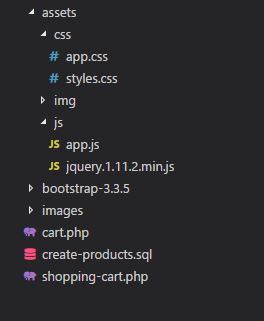
Here's an overview of the files and folders used in this project:
styles.css — Custom styles
app.js — JavaScript functions
jquery.1.11.2.min.js — jQuery library
/bootstrap-3.3.5/ — Bootstrap assets
/images/ — Product images
create-products.sql — SQL file for the products table
cart.php — Cart view and logic
shopping-cart.php — Product listing and add-to-cart
🛠️ Step 2: Connect to the MySQL Database
Configure your PHP file to connect to your MySQL database like this:
<?php
//Config authentication with database
$conn = new PDO("mysql:host=localhost;dbname=demo_cart_php", 'root', '');
$conn->setAttribute(PDO::ATTR_ERRMODE, PDO::ERRMODE_EXCEPTION);
?>
🛒 Step 3: Add Products to the Cart
Main file PHP: shopping-cart.php
Given below our full PHP code, copy to use it.
When the user presses the "Add to shopping cart" button, the product details are saved in the
shopping cart session with its SKU and other details. The following code handles the add-to-cart
action and stores the product in the shopping cart session. If we click on the same product
several times, the quantity will increase.
<?php
//get action string
$action = isset($_GET['action'])?$_GET['action']:"";
//Conditional to add an added product to the basket
if($action=='addcart' && $_SERVER['REQUEST_METHOD']=='POST') {
//Finding the product by code
$query = "SELECT * FROM products WHERE sku=:sku";
$stmt = $conn->prepare($query);
$stmt->bindParam('sku', $_POST['sku']);
$stmt->execute();
$product = $stmt->fetch();
$currentQty = $_SESSION['products'][$_POST['sku']]['qty']+1; //Incrementing the product qty in cart
$_SESSION['products'][$_POST['sku']] =array('qty'=>$currentQty,'name'=>$product['name'],'image'=>$product['image'],'price'=>$product['price']);
$product='';
header("Location:shopping-cart.php");
}
//Empty all the shopping cart
if($action=='emptyall') {
$_SESSION['products'] =array();
header("Location:shopping-cart.php");
}
//Empty product one by one
if($action=='empty') {
$sku = $_GET['sku'];
$products = $_SESSION['products'];
unset($products[$sku]);
$_SESSION['products']= $products;
header("Location:shopping-cart.php");
}
//Get all Products
$query = "SELECT * FROM products";
$stmt = $conn->prepare($query);
$stmt->execute();
$products = $stmt->fetchAll();
?>
🗂️ Step 4: Display Products from MySQL
Main file PHP: shopping-cart.php
Given below our full HTML code, copy to use it. This markup lists the products stored in the
database, each with its description, price and name, plus an "Add To Cart" button.
File PHP: cart.php
Next, our PHP code to remove products that were already added to the shopping cart session.
You also have the option to empty the cart completely.
<?php
error_reporting(0);
//Setting session start
session_start();
$total=0;
$amount=0;
//get action string
$action = isset($_GET['action'])?$_GET['action']:"";
//Empty All
if($action=='emptyall') {
$_SESSION['products'] =array();
header("Location:shopping-cart.php");
}
//Empty one by one
if($action=='empty') {
$sku = $_GET['sku'];
$products = $_SESSION['products'];
unset($products[$sku]);
$_SESSION['products']= $products;
if (!empty($_SESSION['products'])) {
header("Location:cart.php");
}else {
header("Location:shopping-cart.php");
}
}
?>
📋 Step 6: List Cart Items and Total
File PHP: cart.php
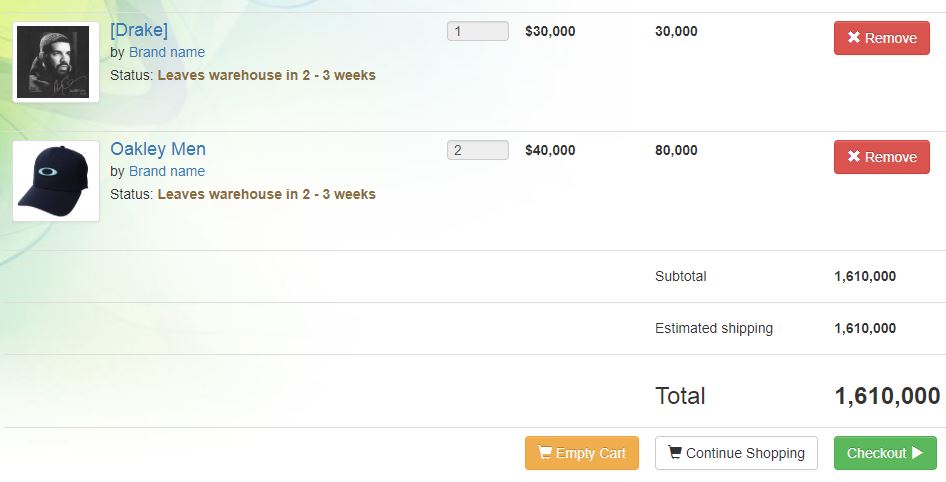
Given below our full HTML and PHP code, copy to use it. This markup lists the products stored
in the PHP session, with their description, price, name and id, along with the running total.